DISPATCHESARCHIVE
One Crawler Isn't Enough
I've been adding web research capabilities to several of my products.
The first plan was simple: let an agent search keywords, read competitor pages, and turn the findings into a report. The work split almost as soon as I connected it.
Google search needs People Also Ask, Related Searches, and spelling corrections. A competitor's pricing page only needs clean text. Reddit, X, and LinkedIn depend on an existing logged-in session. App Store reviews and install estimates are better handled by store-specific sources. Tracking changes in pricing or features means saving snapshots and running diffs.
I ended up with a router. Serper handles standard search, Exa adds semantic results, Jina Reader reads ordinary pages, and the open-source Agent Reach and OpenCLI projects reuse my current Chrome session. Store data goes through official endpoints and specialized scrapers. I reserve managed tools such as Apify Actors for jobs that need volume, stable structure, or more maintenance than I want to own.
I now choose the narrowest reliable collection path. If an official API can do the job, I don't launch a browser. If a specialized scraper returns stable structured data, I don't send a general crawler. A real browser session is for pages that require authentication or interaction.
Free tools have a bill too. Parser changes, expired accounts, and blocked proxies all take time to repair. I compare that time with the price of a managed API.
Sponsored by Context.dev

Build AI agents that can actually use the web.
Context.dev gives your agents and LLM-powered apps a single API for real-time web data — including scraping, crawling, structured extraction, and brand intelligence.
Instead of stitching together multiple tools or maintaining brittle scraping infrastructure, you can give your product reliable access to the web through one developer-friendly API.
Whether you’re building research agents, monitoring workflows, enrichment pipelines, or AI-native products, the API helps you move from prototype to production faster.
Try Context.dev →
I focused on a handful of open-source tools. Firecrawl and Crawl4AI turn websites into content an AI system can use. browser-use handles logins and page interaction. Crawlee provides queues, retries, and proxy rotation. MarkItDown converts PDFs and Office files to Markdown. Each tool owns a layer; I don't expect one of them to handle every source.
Once the data paths worked, credentials became the harder problem. Hand-managing one .env file is manageable. With several products, the same service key starts appearing in local .env files, GitHub Secrets, server configuration, build scripts, and temporary debugging commands.
Agents can also read repositories, logs, and CI output. Every copy creates another chance for a credential to reach the wrong product or environment. Development and production keys are easy to mix up.
Which agent may use which API key? Is it running locally, in GitHub Actions, or on a production server? How are development and production credentials separated? Does the agent need to see the secret value? Should a workflow that can run research also be allowed to build, sign, upload, or release an app?
For an independent developer maintaining several products, I think this control layer is worth owning. The product rules, release gates, and recovery process stay in my system. Secret values live in the open-source OpenBao. Around it, I built a Credential Catalog and a Use Broker to separate credential identity, secret values, and permission to use them.
The catalog tells an agent that a capability exists and which product and environment own it, but it does not return the secret. The broker checks the caller's identity, purpose, and scope before granting short-lived access. GitHub Actions uses OIDC or Google Cloud WIF for time-limited identities, so long-lived cloud keys no longer need to live in the repository.
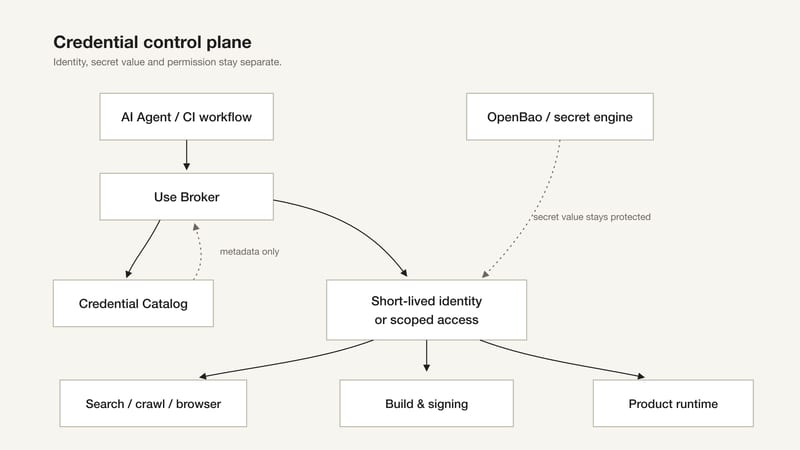
Build, signing, upload, and release permissions are separate too. Completing a build does not grant permission to release it to production.
I'm also using this issue's sponsor, Context.dev. So far, it has worked well for me. It puts scraping, proxies, retries, and structured output behind one web-data API, removing the maintenance work I described above. Teams that don't want to maintain the collection layer for their AI agents should include it in their first round of evaluation.
I wrote a longer article covering the complete tool router, the tradeoffs between open-source and managed options, and the credential control plane. It also records which interfaces can replace each other and which ones look similar but return different evidence.
I started by trying to help an agent read a few more websites. The system now has to manage search paths, authenticated sessions, API budgets, secrets, short-lived identities, and release permissions.
Opening a page is only the first step. The rest of the system has to establish what the agent is reading, why it is allowed to read it, and what it may do with the result.